
Building content for social media does not have to drain my budget. There are plenty of affordable gadgets that help me get started with quality filming, audio, and editing, so my posts and videos look polished without needing expensive studio equipment. Today, I’ll share my favorite low-cost gadgets that make it easier to create engaging content, whether I’m posting short videos, livestreaming, or snapping product shots. With more people joining in every day, finding trusty gadgets that don’t break the bank is more important than ever.
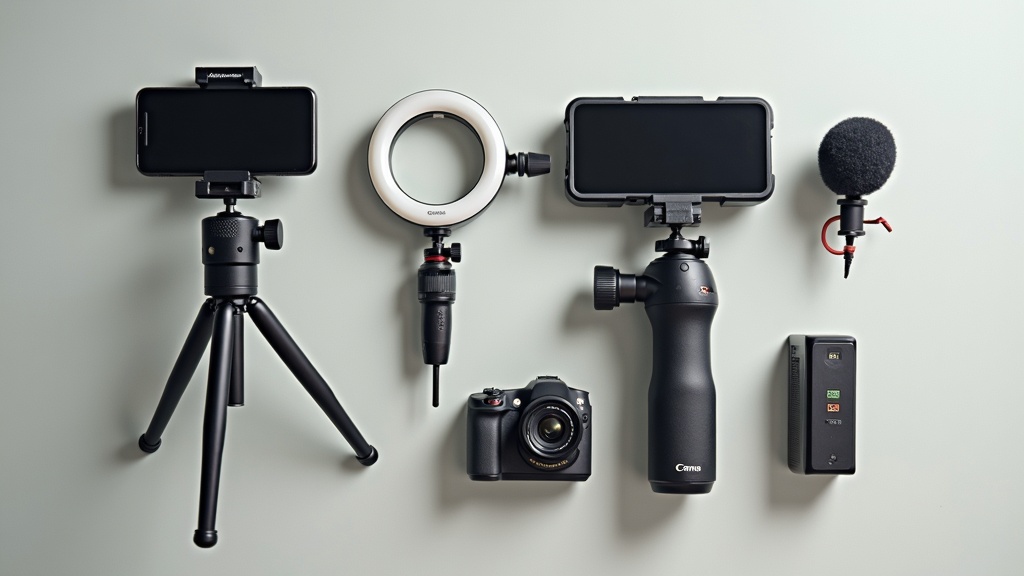
Starter Equipment For Social Media Content Creation
Picking the right affordable equipment can feel overwhelming at first. With so many options, I used reviews, online testimonials, and my own experience to focus on tools that genuinely help beginners. The goal is to make it easy for anyone to upgrade their content without complex setups or big spending.
As social media platforms keep evolving, even basic gear can deliver content that stands out. For example, simple lighting and smartphone accessories have helped me improve my videos and photos a lot. Affordable gear means more people can jump in and start making their mark. Plus, the competition pushes tech companies to make budget gadgets better every year.
Statistics reflect this switch up in the creator economy. Reports from Influencer Marketing Hub in 2024 reveal that over 200 million people consider themselves content creators worldwide, many using budgetfriendly gadgets at the start of their adventure. Owning the right gear early makes a difference in building confidence while growing your following over time.
Choosing The Right Affordable Gadgets
I started out confused between dozens of gadgets, unsure which actually made a difference. Over time, it became clear there are just a few key tools I use daily, especially when sticking to a tight budget.
- Smartphone Tripod: A good tripod gives my shots much-needed stability and lets me shoot hands free. Models with flexible legs can wrap around surfaces or stand on uneven ground for creative angles. These tripods are lightweight and slip into my backpack with no hassle.
- Ring Light: Lighting changes everything. Even basic ring lights under $30 help brighten my face and reduce shadows, making live streams and selfies look more professional. Some even offer color settings for extra mood and style.
- Wireless Lavalier Microphone: Audio quality is super important for reels, interviews, and YouTube shorts. Clipon mics are cheap and plug right into my phone or camera, improving sound by a lot. Clear audio ensures viewers stick around for the full video.
- Budget Action Camera: While many creators start with just a smartphone, affordable action cameras like the entrylevel GoPros or Akaso models let me film outdoors, underwater, or on the move without risking my primary phone. These rugged cams inspire me to be more adventurous with my content.
- Portable LED Fill Light: For static product photos or food images, a pocketsized fill light makes everything look cleaner and sharper, helping me stand out in a crowded feed. They come with adjustable brightness, perfect for customizing each shot.
The best part is that each of these gadgets is easy to find online or at most electronics stores at under $50 each, making them accessible for just about anyone. Their userfriendly design means new creators spend less time learning and more time making content. It also means that experimentation is encouraged—you can switch things up easily with new setups.
Getting Started: My Step-By-Step Beginner Content Kit
When I first decided to level up my social posts, I looked for affordable gadgets that required almost no technical learning curve. Here’s a simple breakdown I usually recommend to friends starting out:
- Pick a Tripod: Stability is my foundation. I always grab a tripod designed for smartphones, which also works for mirrorless cameras if I ever upgrade. Tripods with universal mounts add flexibility to futureproof your kit.
- Focus on Lighting: A basic ring light or clipon fill light travels with me for indoor and outdoor filming, especially when natural light fades. Try experimenting with different positions to see what flatters your face or makes products pop.
- Upgrade My Sound: Even the best video looks amateur if the audio is full of background noise. A basic lapel mic helps every spoken word or voiceover come out crisp and clear.
- Plan for Portability: Gadgets like action cameras and compact flexible tripods help me shoot anywhere. Cafes, parks, or at home—mobility matters when capturing unexpected moments.
- Smooth Editing: While not a gadget, using free or cheap smartphone apps like CapCut and Snapseed makes quick edits, trims, or color changes easy. My content looks fresh and true to my style even on a budget. Experimenting with app effects and filters keeps my posts varied and engaging.
By keeping things simple, I was able to start strong and learn what gear actually matters for my personal style. There’s no need to buy everything at once—build your kit slowly as you figure out what’s missing from your process through trial and error.
Things To Think About Before Buying EntryLevel Gear
Sticking to a budget is really important, but that doesn’t mean sacrificing results. Here are a few things I always check before spending on gadgets:
- Device Compatibility: I doublecheck that microphones, tripods, and lights work with my current phone or camera, whether I’m using iOS, Android, or another platform. Some gadgets require a specific app or driver, so it’s wise to read the product page carefully.
- Battery Life: Portable lights and wireless mics are great, but I always check how long they last so they don’t die in the middle of a shoot. Devices with USB charging are easier to top up on the go.
- Portability: Smaller gadgets fit inside my backpack, which means I can film or edit from just about anywhere. I don’t need much storage space, making it simple to shoot on the run.
- Ease of Use: I go for gadgets that don’t require reading long manuals or learning complicated setups. Just plug in or switch on and I’m ready to go. The best gadgets have simple buttons and minimal setup time.
Compatibility Matters
A lesson I learned the hard way was making sure my accessories are compatible. Once, I bought a microphone that didn’t work with my current phone. Since then, I pay attention to things like cable types or wireless connection options. Some gadgets need adapters, which are usually affordable if I check ahead of time. Research in advance saves trouble later.
Reliable Battery Life
Nothing is more frustrating than a dead battery midedit or during a recording session. Rechargeable gear is my preference. I carry small battery packs, and I always keep devices charged the night before shooting. Power management is essential, especially for outdoor creators who may not have access to outlets.
Easy to Take With Me
If a gadget fits in my everyday backpack or tote, it quickly becomes part of my regular routine. Heavy or bulky accessories end up staying at home, so I look for compact tripods, pocket LED lights, and action cameras no bigger than my palm. Convenience means more spontaneous content and less hesitation to start recording.
Extra Tips for Content Creation On a Tight Budget
After a bit of practice, I picked up a few tricks that raised the quality of my posts without any extra gadgets or big purchases.
Natural Lighting: I always try to film near windows or outdoors during the morning or late afternoon for the best natural light. A ring light helps, but nothing beats free daylight, which is flattering and reliable. If in doubt, step outside for instant light improvement.
DIY Reflectors: To soften shadows and fill in light, using a large sheet of white paper or a piece of tinfoil works surprisingly well for product photos or portraits. These cost nothing and can be carried anywhere, making every shoot a bit more eye-catching.
Editing Magic: Free apps like Snapseed (for photos) or CapCut (for video) are easy to use and make my content look more polished with filters, color correction, and cropping tools. Try different presets for mood, or tweak specific settings for extra punch.
Organize My Workflow: Keeping files organized on my phone or cloud storage helps me quickly find raw footage or past edits for repurposing and reposting. Sorting work into folders by date or project keeps things running smoothly.
Everyday Uses For Budget Content Creator Gadgets
Affordable creator gear isn’t just for professional influencers. I use these same tools for:
- Filming Unboxing Videos: A tripod and ring light help keep the focus on products and reactions, making the video feel next-level cool without any editing tricks.
- Vlogging On The Go: Small action cameras and wireless mics are great for travel diaries or street interviews because they’re light and easy to carry.
- DIY Product Shoots: Portable lights and sturdy mounts turn any tabletop into a mini studio for side hustles like selling handmade goods or vintage finds. These photos look more professional and can attract more buyers online.
- Educational Content: Recording quick tutorials or step-by-step guides for TikTok, YouTube Shorts, or Instagram Reels works best with static mounts and clear sound. Good lighting and audio are key for learning-focused content.
Many creators also use these budget gadgets for Zoom meetings, virtual workshops, or family video calls—showing that smart gear investments pay off in everyday life as well.
Questions Beginners Ask About Affordable Content Gear
I get a lot of questions from friends and new creators about starting with budget gadgets. Here’s what comes up most:
Question: What’s the first gadget to buy if I’m just getting started?
Answer: I always recommend a tripod with a phone mount. Stability instantly improves both videos and photos, and hands free shooting is a gamechanger for everything from group selfies to tutorials. It makes a huge impact with the smallest investment.
Question: Do I need a special camera, or is my phone enough?
Answer: Most recent smartphones have cameras good enough for social media. Only once I started feeling limited did I consider an action camera or low-cost digital camera for special projects or settings like extreme sports and underwater shots.
Question: How can I get better audio without spending a lot?
Answer: A lapel or lavalier mic that plugs directly into my phone microphone jack or uses Bluetooth has made the biggest difference for under $25. Reducing wind and background noise helps keep my audience engaged, and is critical for interviews or quick how-to guides.
Starter Pack: My Affordable Content Creation Essentials
If I were to build a starter pack for content creators working with a small budget, I would include:
- Flexible phone tripod
- Clipon ring light or portable LED
- Entrylevel lavalier microphone
- Pocketfriendly action camera (optional but great for variety)
- Threeinone charging cable and power bank
These basics help anybody begin shooting videos, going live, or taking sharp, clear photos right away. I started with these same tools and still use them often after upgrading other parts of my setup. Upgrades come with time and experience, but never feel pressured to buy everything at once. Start with what you need most and build up.
I find that the right budget gadgets help me to experiment, learn, and stand out, even on a small budget. With just a few investments, my social media posts have become more engaging, and that’s often the step that opens bigger opportunities over time. If you’re creative and consistent, simple gadgets are all you need to get your ideas out there and start growing your digital presence. Remember, it’s about telling your story in your own style and having the right tools can really give you a boost on that adventure.
**Here’s a Little Transparency: Our website contains affiliate links. This means if you click and make a purchase, we may receive a small commission. Don’t worry, there’s no extra cost to you. It’s a simple way can support our mission to bring you quality content.**